Stop guessing your cut sizes.
CutBoard lays out your boards, sheets, and slabs on screen before you touch a saw — so you know every size, catch overlaps, and cut less waste. Works for plywood, lumber, live-edge slabs, whatever you're cutting.
Measuring by hand wastes material — and your time.
You've got a stack of plywood, a pile of lumber, or an oddly-shaped slab, and a list of pieces to cut from it. Doing that math in your head — or worse, on a scrap of paper — means wasted sheets, mismatched pieces, and a second trip to the lumber yard.
See the whole layout before you cut anything.
CutBoard puts your boards on a real-scale canvas. Drag pieces into place, let auto-arrange pack them tight, and print a labelled cut sheet — so every cut is planned before the saw ever turns on.
Plywood, lumber, or a photo of a raw slab — CutBoard handles it.
Drag-and-drop layout
Click to select, drag to move, drag the gold corners to resize. Everything snaps to your saw kerf automatically.
Auto-arrange + waste %
One click packs your pieces onto your boards to minimize offcuts, and shows exactly how much of each board you're using.
Any material, any shape
Rectangular sheets and lumber, or an organic slab traced straight from a photo — including crack and void zones.
Print-ready cut sheets
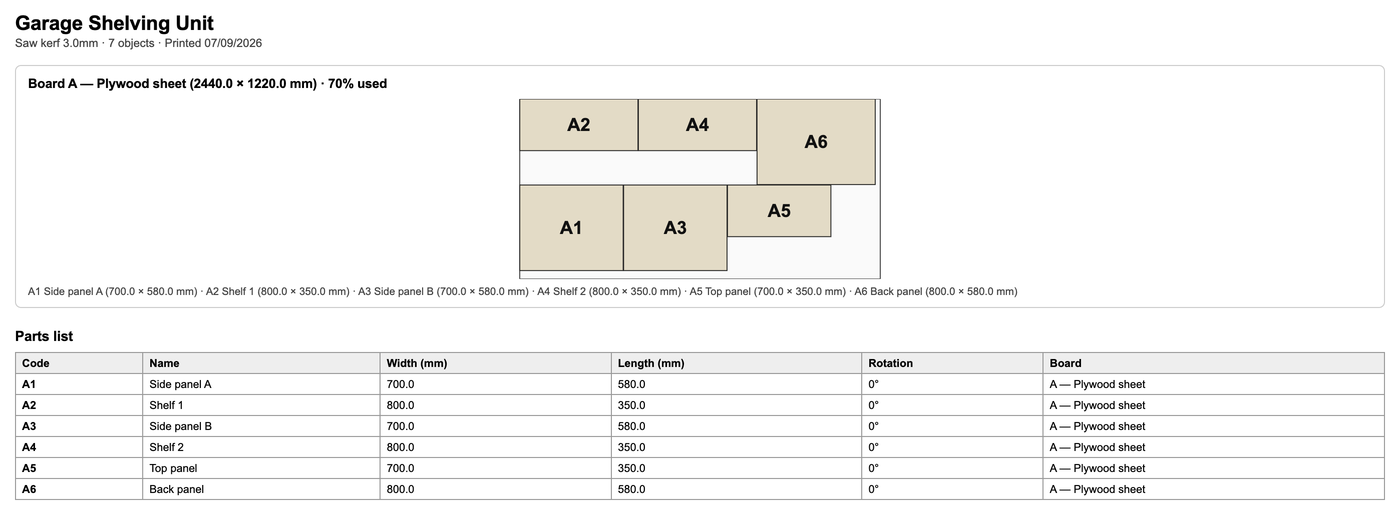
A labelled diagram per board plus a full parts list — print it once and your phone never has to come near the saw.
Cloud save
Pro projects save to your account, not just your browser — open the same project from your laptop or your phone.
Built for desktop and tablet
Layouts have a lot of moving parts, so CutBoard is built to give them room — a laptop or tablet is the sweet spot. It works on a phone too, for a quick check.
Leave your phone in the house. Bring the paper.
Sawdust and touchscreens don't mix. Plan the whole layout on your laptop or tablet from wherever's comfortable, then print the cut list once — you don't need to bring any screen anywhere near the saw. No dust in the charging port, no sawdust ground into the glass, no risk of dropping it in a pile of offcuts. Your device stays clean and working like new for years longer, and the paper doesn't care about a little dust.
Three steps from "what am I cutting" to "here's the cut list."
Add your boards
Type in dimensions, or pick a template — plywood, 2×4 lumber, or your own common sizes.
Arrange your pieces
Drag them into place yourself, or hit Auto-arrange to pack them tight in one click.
Print and cut
Get a labelled diagram per board and a full parts list — no more guessing.
Free forever. Upgrade whenever you outgrow it.
Pro unlocks unlimited boards and pieces, auto-arrange, print/export, and cloud save.
Free
- 1 board or sheet
- Up to 6 pieces
- Drag, resize, rotate
- Slab tracing from photo
- Print & export
- Auto-arrange
- Cloud save
Pro
- Unlimited boards & pieces
- Auto-arrange to cut waste
- Print & export, no limits
- Cloud save, any device
- All Free features
Questions people actually ask
Does it really work for any type of board?
Yes. Rectangular sheets and lumber work out of the box with exact dimensions. For anything irregular — a live-edge slab, reclaimed timber, an odd offcut — import a photo, calibrate the real size against a known measurement, then trace the outline and any crack or void zones.
Do I need an account to try it?
No. Open the tool and start — your project autosaves in your browser. You only need an email if you subscribe to Pro (for cloud save and billing).
Can I use it on my phone or tablet?
It works on a phone, but the side panels take up a lot of a small screen, so we'd recommend a tablet or desktop for actually building a layout. Your phone is fine for a quick check or pulling up the parts list mid-project.
What happens to my projects if I cancel Pro?
Your local, in-browser projects are untouched — those were never tied to a subscription. Cloud-saved projects stay in your account but become read-only until you resubscribe.
What's your refund / cancellation policy?
Cancel anytime from the account panel in the app — no phone calls, no retention flow. Subscribing gives you immediate access to Pro features, which under EU consumer law means you're agreeing to waive the standard 14-day withdrawal period for this digital subscription (you'll see this noted at checkout).
Is my data private?
Your project data stays in your browser unless you're on Pro and choose to save it to the cloud. Slab photos never leave your device unless you save that project to the cloud too.